Related Articles




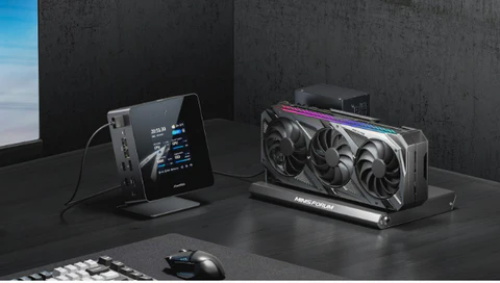
In today's world, where work, play, and everything in between demand a balance of flexibility and performance, the traditional full-tower desktop is no longer the only option. The rise of slim, stylish, space-saving mini PCs and highly upgradeable modular desktops marks a significant shift in our understanding of computing. Whether you're editing 4K video on a living room shelf, quietly gaming behind a monitor, or building a workstation that can adapt to changing needs year after year, the ability to choose form factor, upgrade path, and lifespan is now more important than simply hardware configuration.
Mini PCs have shed their previous limitations of insufficient performance, now delivering powerful performance in extremely compact chassis. Meanwhile, modular desktops offer a smart long-term strategy: invest in a platform once and replace modules such as graphics cards, I/O ports, and storage devices as needed. Industry trends also confirm this shift: companies like Framework are designing desktops around modularity, while Intel has even proposed a mini-PC architecture that separates the CPU, GPU, and I/O modules to improve upgradeability and reduce e-waste.1
Why Mini PCs and Modular Desktops Are Worth Your Attention?
Mini PCs: Compact Design, Powerful Performance
The concept of mini PCs—packing a complete desktop system into a smaller chassis—has evolved rapidly. Many recent reviews emphasize that mini PCs are no longer just inadequately powerful convenience devices; they have become true tools for work and entertainment. For example, a recent review of the ASUS ROG NUC noted that it is “smaller than a PS5, yet delivers one of the best gaming performances among pre-built PCs.”2 Another 2025 mini PC overview highlights the excellent performance across various categories, from entry-level to creative to gaming. The advantages of mini PCs include:
● Small footprint: Easier to place behind a monitor, on a shelf, or in small spaces.
● Compared to full-tower desktops, they consume less power and generate less heat (in many cases).
● Quiet and versatile—many models support multiple monitors, VESA mounting, and high-end connectivity.
● Enhanced upgradeability: More models support SSD/RAM expansion than ever before.
However, there are also drawbacks: thermal limitations, less space for large discrete graphics cards, and sometimes higher cost per performance than tower desktops.
Modular Desktops: Future-proof and Customizable
On the other hand, modular desktops prioritize customization, upgradeability, and sustainability. A modular desktop is more than just a self-assembled computer; it's a design philosophy where components, modules, or modular units are replaceable or configurable, extending their lifespan.
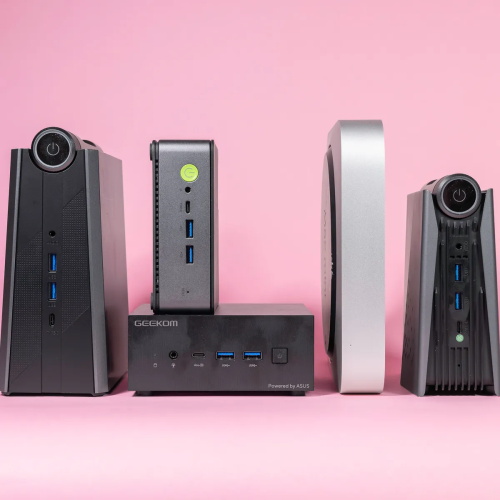
A Lenovo article explains the advantages of modular desktops: customization for specific workloads, scalability to accommodate future updates, improved cost-effectiveness over time, easier repair, and environmental benefits. Another article describes how these construction methods help improve space utilization and scalability, allowing users to replace components without replacing the entire system.3 Advantages of Modular Desktop Systems:
● Long-term upgrade path: Replace the graphics card, add storage, replace the graphics card again, instead of buying a new machine.
● Ease of repair: Faulty parts can be replaced without scrapping the entire system.
● Sustainability: Reduces e-waste and allows for better reuse of components.
● Tailored to different types of users (gamers, content creators, enterprise users) and equipped with corresponding modules.
Disadvantages: Initial cost may be higher, component compatibility requires a learning curve, and it is sometimes not as plug-and-play as a sealed system.
How to Choose: What factors are important?
When choosing between a mini PC and a modular desktop, here are some key criteria to guide your decision.
1. Performance Requirements and Use Cases
Q: What will you primarily use it for?
Office/Web browsing/Email: Basic configuration is sufficient.
Creative tasks (photo editing, 4K video): Mid-to-high-end CPU, fast storage, good GPU.
Gaming/AAA games: High-end GPU, good cooling, high-bandwidth memory.
2. Form Factor and Space Constraints
Mini PCs are very appealing if space is limited (e.g., home office, behind a monitor, media center). However, always check for ventilation and heat dissipation. Modular desktops may be slightly larger (although some mini-ITX cases can remain compact). Also consider the mounting method (VESA), front and rear I/O ports, and how it integrates into your workspace.
3. Connectivity and Input/Output
Modern systems should offer: Thunderbolt 4/USB4, USB-C, HDMI/DisplayPort, dual 2.5GbE or higher, Wi-Fi 6/7, and Bluetooth 5.x. Many mini PC reviews emphasize the importance of port diversity.
For modular desktops: Look for expansion card slots, modular front panels/modules, and upgradeable ports (e.g., front panel modules, optional network modules).
4. Upgradeability and Thermal/Power Margin
Especially for modular desktops or high-end mini PCs, you need to consider the following: upgradeable SSDs/RAM, spare slots, potential support for graphics card docks/external graphics cards, and good thermal performance. Reddit users often remind users that some mini PCs look great on paper but actually have thermal bottlenecks. For modular desktops: check how easy it is to open, replace modules, and upgrade later.
5. Value and Lifespan
While compact systems generally have a higher cost per unit of performance than full-tower cases, their real value lies in their long lifespan and flexibility (especially modular systems). If you can upgrade components instead of replacing the entire computer, you'll save money in the long run. Modular desktop advantages overview: "While the initial investment may be higher, modular desktops save long-term costs through upgrades rather than replacements."
Also consider resale value, warranty/support, and the platform's future-proofing (e.g., support for new standards like Wi-Fi 7, USB4, and NPU/AI chips).
Featured Products: Mini PCs and Modular Desktops for Flexibility and Convenience
The following eight products offer powerful performance, some emphasizing compact design, others highlighting modular versatility, each suitable for different types of users. (All product links point to retailers.)
Here are detailed descriptions of each:
Minisforum UM790 Pro Mini PC: A high-performance mini PC designed for content creators and multitasking users. Ideal for intensive workloads (e.g., 4K editing, multiple monitors).
Beelink SER8 Mini PC: Compact size with excellent gaming performance. Supports powerful configurations (e.g., Ryzen 7 8745HS) and dual-channel DDR5 memory.
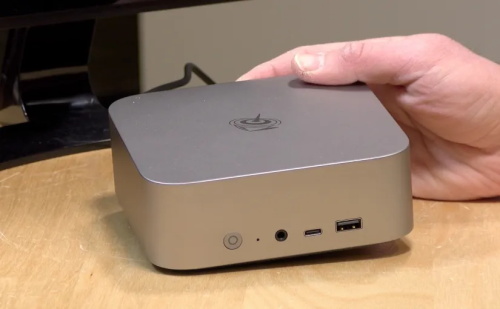
GMKtec NucBox M5 Plus Mini PC: A cost-effective option. Compact size, powerful features, and upgradeable.
Lenovo ThinkCentre M75q Gen 5 Mini Desktop: A business-oriented mini desktop: ultra-compact, secure, and reliable for the workplace.
GEEKOM A5 Mini PC: An entry-level mini PC with an affordable price but still decent specs, suitable for general home/office use.
Lenovo ThinkCentre M75q Gen 2 Tiny Desktop: Another small business desktop, although slightly older, it's still a good choice if you're looking for reliable performance in a small space.
ASUS NUC 14 Essential Kit: A barebone mini PC kit: If you enjoy customizing memory/storage and building your own mini PC from scratch, this kit is perfect for you.
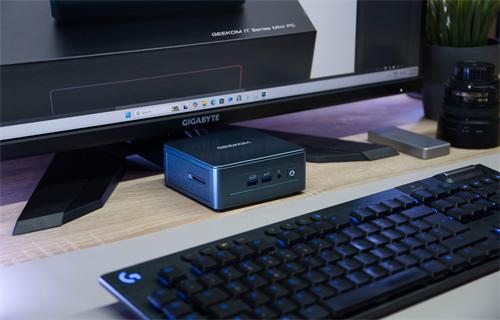
GEEKOM IT13 Mini PC 2025 Edition: A high-end mini PC with a 13th-generation Intel i9 processor, small in size but powerful in performance, ideal for users who want near-desktop performance in a mini form factor.
By 2025, the landscape of personal computing will have changed. The era of needing bulky tower PCs for high performance is over. At the same time, the era of "buy once, discard later" is also fading away. Flexibility—both in terms of size and lifespan—is now a primary design goal.
If you prioritize a sleek and compact design, opt for a powerful mini PC. If you want overall control and future upgrade potential, choose a modular design.
The products listed above cover different budgets and use cases. You can choose one now and be confident that you're investing in a platform that can grow with you. As workloads increase (e.g., 4K/8K editing, AI, multi-monitor creative work, high frame rate gaming), the flexibility to upgrade is far more valuable than the current hardware configuration.
Sources:
1: https://www.tomshardware.com/tech-industry/intel-proposes-easily-repairable-and-sustainable-modular-pc-design-for-laptops-and-mini-pcs
2: https://www.techradar.com/computing/gaming-pcs/asus-rog-nuc-2025-review
3: https://rahatcomputer.com/benefits-of-a-modular-desktop-pc-setup.html
References:
https://www.lenovo.com/us/en/knowledgebase/what-are-the-benefits-of-modular-desktop-design
https://enicomp.com/the-role-of-modular-pc-builds-in-reducing-e-waste
