Related Articles




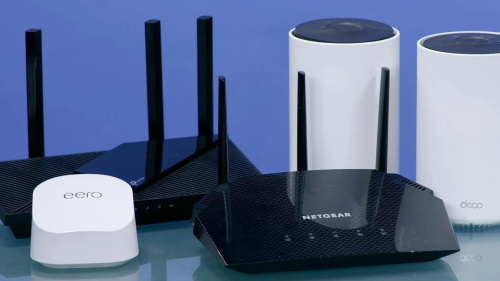
The smart home era is rapidly evolving. As our homes become increasingly intelligent—equipped with dozens of IoT sensors, cloud gaming devices, 4K/8K streaming TVs, AR/VR headsets, and multiple people working and playing simultaneously—the demands on networks are unprecedented. Therefore, upgrading to two key technologies—5G home internet and Wi-Fi 7 (also known as IEEE 802.11be)—is no longer a "nice-to-have," but a serious consideration for any user looking to ensure their home network is future-proof.
Wi-Fi 7 promises significant upgrades: ultra-wide 320 MHz channels, the ability to use multiple frequency bands (2.4 GHz, 5 GHz, and 6 GHz) simultaneously via multi-link operation (MLO), and a higher-order modulation scheme (4K-QAM) that can carry more data per signal.1 Real-world applications range from smooth 8K streaming to lag-free cloud gaming and ultra-sensitive smart home devices. Meanwhile, 5G home routers are gradually becoming a viable alternative or supplement to wired broadband—especially suitable for areas requiring redundancy or with limited fiber/cable coverage.
Wi-Fi 7: A Major Leap Forward in Home Wireless Technology
The leap from previous Wi-Fi versions to Wi-Fi 7 is far more than just incremental improvements. New features include:
● Wi-Fi 7 (IEEE 802.11be) supports an ultra-wide 320 MHz channel, an improvement over Wi-Fi 6E's 160 MHz channel.
● Multi-link operation (MLO) allows a single device to use multiple frequency bands (2.4 GHz, 5 GHz, 6 GHz) simultaneously to increase throughput and reduce latency.
● A higher modulation scheme (4K-QAM in Wi-Fi 6 compared to 1K-QAM) means each signal contains more bits.
● A significantly increased theoretical maximum data transfer rate: some articles indicate that it can reach 46 Gbps under ideal conditions.
● Real-world testing shows that even at long distances, Wi-Fi 7 outperforms Wi-Fi 6E: for example, at approximately 0.6 meters, Wi-Fi 7 reaches speeds of 3.6 Gbps, while Wi-Fi 6E achieves around 2 Gbps.2
● Its advantages extend beyond speed, encompassing capacity (allowing for more devices to connect without congestion), reliability, and low latency—ideal for smart home devices, AR/VR, cloud gaming, and multi-device torrenting.
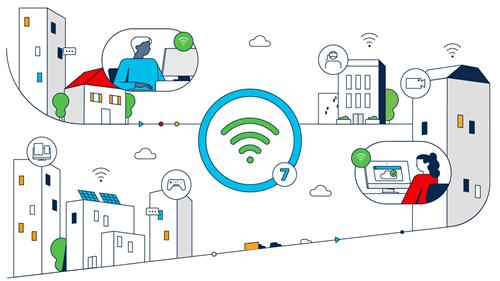
So, if you think, "My old router is working fine," you're right—it might be sufficient for basic web browsing. But what if you have dozens of smart home sensors connected simultaneously, a 4K/8K streaming TV, and guests playing games upstairs? That's where Wi-Fi 7's advantages truly shine.
5G Home Networks: Wholesale and Backup Connections
Meanwhile, 5G is no longer limited to mobile phones. Many Internet Service Providers (ISPs) now offer 5G Fixed Wireless Access (FWA) or home routers, eliminating the need for traditional cables/fiber optic connections. Its importance lies in:
● If your wired network options are limited (e.g., rural areas, long fiber optic deployment times), or you need redundancy/failover capabilities, a 5G home router can transform your network experience.
● Some 5G home routers now support very good throughput, especially on less congested frequency bands.
● For smart homes, the ability to have multiple WAN links (wired + 5G) enhances network resilience: if the main line goes down, 5G can take over.
Therefore, the future of a "smarter home network" is actually a combination: a reliable wired/fiber backbone + home Wi-Fi 7 + optional 5G home router/backup/secondary links.
When to Upgrade (and When to Wait)?
If you are currently using a regular router with only a few devices and occasional streaming → you probably don't need Wi-Fi 7 yet.
If you own or plan to own: a 4K/8K TV, cloud gaming, VR/AR, numerous IoT devices, a large home, and dozens of concurrent users → upgrade now.
Similarly, if your internet service provider is about to launch multi-gigabit broadband (2-5 Gbps or higher), you'll need a router and WiFi system capable of handling that bandwidth.
For 5G home networks: If you live in an area with good 5G coverage and want an alternative to wired networks, or need redundancy, consider using a 5G-enabled router.
Buying Guide: Top Gear (2025 Picks)
Here are some recommended products:
eero 7 Dual-Band Mesh WiFi 7 System: A dual-band mesh WiFi 7 system designed for covering larger homes, easy to set up. Ideal for smart homes where WiFi coverage and stability are crucial.
TP-Link Archer BE230 (BE3600) WiFi 7 Router: A more affordable WiFi 7 router. A good entry-level option if you want to upgrade your router but don't need top-of-the-line features.
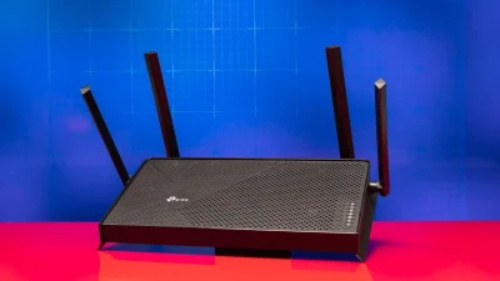
(Image from PC Mag, the copyright belongs to the original author)
NETGEAR Nighthawk WiFi 7 BE3600 Dual-Band Router: A mid-range dual-band WiFi 7 router suitable for most home users.
TP-Link Archer GE800 (BE19000) Tri-Band WiFi 7 Gaming Router: A high-end tri-band WiFi 7 router suitable for advanced users, gamers, large spaces, and multi-device connections.
ASUS RT-BE82U/WiFi 7 Router: A powerful and well-built high-end WiFi 7 router.
StrightTalk 5G/LTE Home Internet Router: A home internet router supporting 5G networks, allowing connection to internet service providers via LTE/5G or as a backup network. Suitable for home environments with inadequate wired networks or as a redundancy solution.
GL.iNet GL-X3000 5G NR Dual SIM Gateway: A niche but practical product: a dual-SIM 5G gateway supporting WAN/LTE fallback, suitable for remote offices, smart home failover, or mobile setups.
eero 7 Dual-Band Mesh WiFi 7 (3-Pack): Another mesh version of the eero 7 (3-pack) – providing additional coverage for larger homes or “whole-house” WiFi.
How to Make Your Smart Home Network Future-ready?
The smart home of the future will be a seamless blend of wired and wireless. You'll need a strong wired backbone (Ethernet or fiber) to provide connectivity for high-end WiFi 7 routers and mesh networking systems, with the option to use 5G connectivity as the primary connection in areas with poor network coverage, or as a reliable backup. If you're planning to buy today, prioritize equipment that meets the following criteria:
● If your budget allows, choose a model that supports WiFi 7 (802.11be), especially a tri-band (2.4/5/6GHz) model.
● Equipped with multiple gigabit Ethernet ports (2.5Gb or higher) on both the WAN and LAN ends.
● For larger homes, consider a mesh system or router that supports nodes.
● Future-proof features: MLO, 320 MHz channels, WPA3 security, and regular updates.
● If you lack wired connectivity options or want greater network stability, this 5G home router is a great choice.
On the other hand: if your internet speed is average, your house is small, or you don't have many devices, you can wait until WiFi 7 prices drop and the device ecosystem becomes more mature before upgrading. But if you're already streaming 8K video, playing games, working in every room, and have a growing ecosystem of smart devices—then now is the best time to upgrade.
Building a smart home for the next 5-10 years? Then invest in WiFi 7 + multiple gigabit ports + mesh network coverage. Think of it as the foundation of a smart home, not a luxury. If you want even more secure network security, you can also pair it with a 5G network as a backup.
Sources:
1: https://www.intel.com/content/www/us/en/products/docs/wireless/wi-fi-7.html
2: https://www.prodigitalweb.com/wi-fi-7-2025-explained
References:
https://www.tomshardware.com/networking/routers/wi-fi-6e-versus-wi-fi-7-which-type-of-router-is-a-better-buy
https://www.wired.com/story/what-is-wi-fi-7
